Archive for the 'Technology' Category

Contact Your MP or Lose Your Rights: Bill C-61 - The Canadian Copyright Act

Bad news in Canada: Yesterday Bill C-61 was tabled and it doesn’t bode well. Among the rights at risk:

  • time shifting (no, not sci-fi time travel but recording television now to view later
  • transferring media (music, video, etc) you own to a portable music/video device that you own (like an iPod)
  • format shifting — transferring media from analog to digital (records to dvd, vhs tapes to dvd)
  • unlocking a cellphone — want to switch providers? you’ll have to buy a new phone
  • unlocking media so you can watch it on a Linux machine or Mac. If it’s made to only work under windows then you’re breaking the law to run it on anything else

Find your MP here: Members of 39th Parliament - Canada, list updated March 2008. Call them!

The legalese details of Bill-C61 here: Bill C-61

There’s a a Facebook group called Fair Copyright Canada started back in December by Michael Geist. It’s a great place for updates. He also has a list of 30 Things You Can Do — so check it out and Do Something. In general, Michael Geist’s blog is an incredible place to keep up with Canadian laws on copyright, technology, internet, etc and the activism necessary to make Canada a great place to live.

I joined the facebook group a few months ago and I phoned my MP, Brian Masse, this morning. I’m going to go through that list and see what else I can do. Canada’s dropped the ball this time around. Instead of a leading model of fair use and fair copy protection we have big business protection and jail time in our futures.

zomg writing is hard (or: Beyond Footnotes)

Forget asking how did people write before word processors — how did people ever write without hyperlinking? I’m going crazy trying to write my final essay of the semester without hyperlinks. Aaarrrggghhhh!!!

It would be so sweet to go beyond footnotes, to be able to include a link to a photo or a text or a discussion or another essay. Alas, when your professor is a historian of print and publishing it just ain’t gonna be happenin’ here.

Another Reason Divorce Sucks for Kids

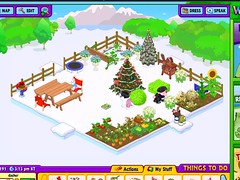
Every time my kids go to their dad’s they ask me to take care of their Webkinz gardens. At xmas time they ask me to loot the NeoPets advent calendar for them. I do my best but times three kids it can add up to a considerable amount of time.

I try hard to get my kids comfortable on the computer, whether it’s through gaming, making their own levels on kGoldrunner, designing title pages and drawing pictures, writing stories, blogging, accessing the home network, troubleshooting, researching, and programming. I know how lucky they will be if they can understand and maintain their own computers and how important technology mastery will be as they grow up.

webkinz garden under snow title=

It doesn’t help the developing computer-love if they come home from their dad’s and their Neopets are dead and their Webkinz gardens have all withered and the food is rotten before it can be harvested. In this case the computer is just another thing that makes them sad. They see their investment as wasted time. They don’t have Internet access at their dad’s and we won’t get into what hardware he must have but there was this project my daughter brought home on a floppy disk. She’s saving for her own laptop but it’s going to be awhile still and that won’t help with the dying frogs and ponies.

Given that after school time is busy with homework and chores these online games should have an option for kids who only really have access to them every-other-weekend. (And that goes for games that offer a paid membership like Runescape). Neopets does have hotels and such where you can park your animals when you’ll be away but the cost adds up. As more and more kids face a double life with often a discrepancy in access to technology how will the technology adapt?

flickr photo by polar bots member mascott girl

How to Procrastinate

When did a B become a bad mark? (omg I hope I don’t get a B on my assignment.) It seems this is what happens moving up into graduate studies. Everyone is stressing over grades. Nothing below an A is good enough and a B is required to pass a course. I hate having that kind of pressure. I did well in my undergrad but even though I stressed over my grades I don’t remember this kind of dread. In my undergrad I wanted high marks but I didn’t need them in the same way I do now. Knowing that good work is a fail and that very good is barely a pass I am paralyzed for fear that my work will be mediocre – or worse — adequate.

There’s been some weird power flickers here today and my desktop keeps shutting down. If it wasn’t happening to the clocks on that side of the house as well as to Rob’s desktop I might wonder if my power supply has finally given up. Since the machine is off anyway I’ve decided I should let things cool down and take this opportunity to replace that power supply. I bought my new one - a 430W Seasonic - at Canada Computers when I was in Toronto last weekend for Mitch’s birthday shindig. The visit with K & Mitch was wonderful, the staff at the computer shop helpful, the curried vegetables at King’s Cafe were amazing but the stress from almost missing the train home because I miscalculated how long the Spadina street car would take to get to Union Station…gulp…that I could have done without.

So anyway, can you tell when blogger-students have papers due? There’s always a flurry of posts. Instead of writing the assignment, we blog. Or maybe blogging is the warm up? To prove to ourselves that we can still put words together and we may as well write the ones our professors want to read instead of the ones that make our significant others/friends/families wonder if we’re/they’re really going to survive our education.

Geeks get the Monthlies

I’ve been playing with calendars on my fresh install of SuSE Linux - experimenting with customizing Lightning for Mozilla Thunderbird and trying out kOrganizer. I’ve got all of my calendars (kids here, kids at their dads, Rob’s kid, campus activities, due dates, birthdays, etc) on the home network so that I can see my events no matter which computer I’m on. Rob’s got the same thing going and we (theoretically) can try and keep track of what each of us is doing.

The only calendar I hadn’t set up yet was for my menstrual cycle — currently the data for the past year is sitting in a MozBackup file on a flash drive that I’ve misplaced. I’ve got the last two months sitting on a gmail calendar so by grabbing that and setting a customized 28-day repeat cycle I can predict approximately when I’m likely to be crampy, miserable and/or cysty for the distant future (until of course perimenopause decides to visit).

woman and girl walking on the beach at sunset

This is why it’s better to put the calendars on the network instead of saving only a local copy — I never want to go through setting this up again.

The first thing I checked was how things line up with my family week-long summer vacation to the beach. Go figure, my period is due the first day of vacation. How’s that for timing? No guarantees since it’s still a few months away, but since I’ve been pretty clockwork at 28 days for the last 2 or so years there’s a pretty good chance I’ll continue to be regular. I’m happy with my Diva cup so it’s not the need to pack supplies that annoys me, it’s the thought of packing, driving, and being on holiday — and needing copious amounts of pain medication.

That said, I think this is a great application of organizer-calendars. It definitely beats counting out 28 days over and over again. I wonder if the Mozilla Foundation would like an add-on? What would it need to include?

flickr photo by CaseyLessard

Breastmilk is Awesome

jars of expressed breastmilk

I’ve known for years (almost 14 — the age of my oldest child) that breastmilk is the absolute best thing in the world. Now there’s one more reason why it’s awesome:

Breastmilk contains stem cells. Seriously. Check out that article.

flickr photo by Hoover Family Photos

About Citing Wikipedia

School’s started up again and if I hear another caveat from a professor telling students not to cite Wikipedia I think I’m going to lose it. In each instance it’s gone something like this:

(Prof): In writing your papers this semester, you’ll be required to use outside sources. When you’re looking for material, do not cite Wikipedia. Anyone know why not to cite wikipedia?

(Student): Because it’s inaccurate.

(Prof): Why is it inaccurate?

(Student): Because anyone can edit it.

(Prof): Very good.

the end

Whether or not you accept Nature’s study that showed Wikipedia to be more accurate than Britannica or Thomas Chesney’s smaller study at Nottingham University Business School in which experts found Wikipedia entries to be highly credible, the reason not to cite Wikipedia is completely different. At the university level we don’t cite the encyclopedia. Any encyclopedia.

When you’re just getting started on a research project, by all means look up information on Wikipedia. You’ll probably find Wikipedia more helpful than Britannica because (1) it’s online making it easily accessible; (2) it’s free; (3 and most significantly) it contains links to other related subjects. I’ve yet to see a print document with linkage to other entries or sites.

Once you’ve found an interesting entry, read all the way to the bottom to the Resource section. Here you will find the footnotes, which contain the information you will need to find the original documents that form the basis for the wikipedia entry. See the titles of journal articles, books, and other scholarly sources? Make a note of these and then go to the library (physical and/or online). Look these up in your school’s journal database, library catalogue, etc and read the complete, original text. And then cite that.

So, there’s no need to even get started on the credibility/accuracy of either encyclopedia or the cooperative vs. competitive model of writing or any other debate.

Summer Job in Toronto at NAC

I got this today from the Women’s Studies department. Looks like an interesting summer position, but too far away for me. Could be a great opportunity for a geeky feminist if you live in Toronto and are still looking for a job.

Communications Assistant (Summer Student)

Employer: National Action Committee on the Status of Women (NAC)
Job term: Contract, Full-time
Location: Toronto, ON

The National Action Committee on the Status of Women (NAC) is a non-profit/non-governmental organization that has been working to ensure the full equality rights of women and girls in all their diversity for 35 years.

Job Summary

NAC is presently seeking a vibrant student to work as a Communications Assistant to work in our National Office. The student will provide support and assistance in research, project development, facilitation and coordination of NAC seasonal initiatives and activities.

Responsibilities:

Communications

  • Assist in regular website maintenance. Compile and distribute electronic newsletters.
  • Assist to design and implement new strategies.

Membership

  • Assist in the processing of membership requests and to do specific follow-up with group and individual members on various issues.

Special Projects

  • Could involve but is not limited to: detailed policy research, project management and development, grant writing assistance, design, selected writing, special event coordination and implementing new administrative procedures.

Office administration

  • Administrative support to the Executive Coordinator: could include research, organizing meetings, helping to liaise with committees.

Qualifications

The qualified candidate for this position will be someone who has a strong research and analysis skills-set, advanced effective research and effective written and oral communication skills, strong inter-personal abilities and has a strong interest and/or academic background in women’s studies or any of the social sciences.

In particular, we are looking for someone who:

  • Is a university or community college student; must have finished the school year and intend to return to school in September.
  • Has advanced computer and Internet literacy, including online research experience.
  • Has excellent written, verbal and telephone communication skills.
  • Is well organized, able to work independently and collectively.
  • Thrives in a small, open-concept office space.
  • Demonstrates the capacity to respond quickly to emerging priorities.
  • Demonstrates good trouble-shooting abilities, flexibility and creativity.
  • Has experience in and enthusiasm for women’s issues, community development and/or community-based researchc
  • Basic web site development skills are an asset.
  • Knowledge of written and spoken French is a definite asset.

Contract Details: The contract is for full-time (30 hours/week) for a maximum of 12 weeks at $10 per hour.
Deadline for applications no later than NOON June 4, 2007.

Interested candidates are invited to submit a current CV and cover letter via email to:
Enisone Kadiri, Executive Coordinator, NAC-CCA
Email: enisone.kadiri@nac-cca.ca

No faxes or phone calls please. While we thank all candidates for their interest, only those short-listed will be contacted.

NAC works from an anti-oppression framework and maintains feminist principles. We are committed to diversity and equitable opportunity; as such, we encourage applications from traditionally marginalized communities. Our place of work is wheelchair accessible.

*Funding for this position is provided, in part, by the Summer Career Placements program of Human Resources and Social Development Canada (HRSDC).*

Laptops in the Classroom

I went to the Teaching and Learning Conference at the University of Windsor on Tuesday. It turns out that this conference is worth at least a couple of blog posts. First one up is about laptops in the classroom.

The session was called “Excellence in Teaching: Ten Useful Strategies for New and Experienced Faculty” and presented by Dr. Mary Stein, Associate Professor in Teacher Development & Education Studies at Oakland University. I had high expectations because I figure there is so much I need to learn and all of these people will know so much. It turns out that panning for gold as far as teaching strategies goes isn’t easy.

Some of the strategies were clearly true. The one that came up under a few headings was planning. Plan out the syllabus, plan assignments, plan assessment, plan your classes. Determine your expectations before the course begins and have it all in the syllabus. This makes good sense — except that a lot of the other sessions talked about interaction between faculty and students and the importance of active learning. There has to be balance between planning in infinite detail and student participation in learning. I think this gets easier with practice.

Another of Dr. Stein’s strategies was to give students sticky labels with their names from a pre-printed class list. In a conversation after the session, two of us were questioning whether or not this would violate the privacy policy at our university. While there’s something to be said for getting to know your students (and it’s important to note that this is much more likely to happen in a class of 20 or even 40 than it will in a class of 700 students) requiring name tags may be a privacy violation. Should students be required to share their names in the classroom or should they get to choose how and when they identify themselves in class?

Dr. Stein also ‘encourages’ her students to upload a photo to the learning management system and joked that during the first week of classes students will generally do what she asks (hinting to her power as “controller-of-the-grade”). Yikes.

One paper-marking strategy I never considered was only marking grammar and spelling errors only so far and then drawing a line where you’ve stopped. The point is to get students who need writing help connected with the resources that will help them learn to write better, instead of spending all of your own time correcting pages and pages of these types of errors. I like this.

The importance of routines was also mentioned and it reminds me a lot of parenting. Lots of parenting books talk about the importance of establishing routines. Clear routines have clear expectations. Clear expectations lead to better cooperation or at least a starting point for discussion when things aren’t working. It’s interesting to see overlap between parenting strategies and teaching strategies but I shouldn’t be surprised. I read Rahima Baldwin’s book, You are Your Child’s First Teacher when my daughter was a baby. Do educators see the parallels and take advantage of the resources written on parenting strategies?

The shocking bits of the session came in the “Learn from your colleagues” section. Someone asked about strategies for student questions and the presenter said she has specific time set aside for questions so that her teaching isn’t interrupted. Another said he has a “parking lot” on the chalkboard where students can write their questions, again so that teaching is not interrupted. I realize that sometimes students will find that their questions are answered if they just wait a minute in the lecture, but it was repeated several times during the conference that lectures are an inefficient way to teach and learn. Why discuss strategies for something that shouldn’t be happening? If the goal is student engagement, active learning, and learning-based pedagogy then students have to have more opportunity and encouragement to engage. If they have a question or comment, doesn’t that show they’re engaged? Isn’t that what everyone is after? If you tell students to park their question, it shows students that their questions don’t count and they’re going to disengage with the class. Moving to other teaching styles is the answer for dealing with this issue.

The ultimate shocker for me was the negativity towards laptops in the classroom. It was incredible — not one positive comment got through although maybe in the hands that didn’t get to comment there were others besides my own. People complained that students who appear to be taking notes are actually doing other things. (omg? really??) Students have always done other things in class besides take notes. Sleeping comes to mind as an example, so does talking, passing notes, drawing, doing other homework, and making grocery and chore lists. As with all things, there are advantages and disadvantages to laptops in the classroom. My favourite example comes from a computer science professor I know. He was teaching a programming class and was showing how to conserve resources in a program. Unaware to the prof, while he continued teaching, a student with a laptop connected to the university’s server and ran the program. Then they raised their hand and said, “I don’t see the results you predict.” Because this student had initiative and resources to do this, the class then went on to explore why it didn’t work according to the theory. This is learning, this is active, this is an opportunity to engage with the students and explore a real problem. Why take this away?

So maybe it isn’t the laptop in class that is the problem, it’s the Internet. Could it be that bringing the Internet into the classroom challenges who is the authority? Does this make some professors uncomfortable? The Web contains multiple viewpoints on every subject imaginable, and I’ve seen it where students look things up to challenge what the prof is saying. I’ve also seen students bring up examples that support the prof. It works both ways. It a women’s history class we were discussing some of the major womens’ organizations in North America over time. Someone asked if one of the groups still existed, prof didn’t know. Again, unknown to the prof, someone else surfed around, found the group’s site, gave an update from their front page, and shared the address with the class. Again: bonus because a student had their laptop in the classroom.

And it’s not just for students, professors can play too! If instructors had a messaging client open during the lecture (sounds off) students could message their questions, effectively dealing with the earlier concern of how to handle questions. There are positive applications of the technology!

So what are the real laptop issues?

  • Students surf.
  • Sometimes they surf because they’re bored. Answer here is engage them with your teaching. That was actually Dr. Stein’s strategy number one: Don’t be boring.
    Sometimes they surf material that isn’t rated E for Everyone. Maybe some guidelines are in order or maybe we need to accept that we can’t protect students from the big/bad/ugly. Students can spend some time at the beginning of the semester establishing a class code of conduct - it at least brings the topic into the arena of discussion. Students who would be offended are forewarned. Same advice we give to people who are offended by breastfeeding: don’t look. Small screens minimize this, and so do bad LCDs that have a limited viewing angle. Only the person close-up and directly in front can see.

  • Students don’t pay attention.
  • This isn’t a new phenomenon created by laptops. Laptops are just a scapegoat. The students who came at least thought there was something about your class that was worth getting out of bed. They could alternatively still be sleeping or hanging in the pub. They are in your class — it’s a start. They will get more out of being there and not giving it their full attention than they would if they weren’t there at all. And students today multitask with amazing proficiency. Even without Alt-Tab. I share that with as many people as I can cause it pains me to watch them click through tabs in the task bar.

    The answer here is definitely not invoking the hokey pokey as one attendee at the session suggested (not in those words but bad enough). It was more along the lines of “require a full body response to a question.” Like raising your hand to different heights to indicate level of agreement with a statement. This is a fine strategy, especially to engage kinesthetic learners, but only to get people to take their fingers of the keys? Missing the point.

    And requiring students to put away laptops/close lids during discussion? Only if you’re also taking away pens, pencils, and paper from all the students.

So what about having laptop section in the classroom? Near the outlets for those who need power. If you don’t want to see the multitasking going on, you don’t look. If the typing bothers you you sit on the other side of the room. It’s true that sometimes the keys are loud. This can be as annoying as screeching chalk. Solution? Quieter keypads and getting over it. Or maybe wearing an ipod is the answer. ;)

CSS Get Naked Day

What happened to the design?

It's CSS Naked Day

Today is the 2nd Annual Naked Day, when people everywhere disable the styles on their websites.

The idea is promoting Web Standards. It’s a good time to see how your site loads (i.e. how far down the page is your real content?)

I tested to see how it would look first in Firefox with the web developer toolbar by simply disabling the CSS ( CSS > Disable Styles > All styles). I was mostly happy with what I saw so in header.php I commented out the call to the stylesheet. There are a few things I see that I need to tidy up but for now, here you have it: my naked blog.

Enjoy.

For more info and a list of sites that have gone naked for the day check out the Annual CSS Naked Day website for more information.

Next Page »